After publishing the Delta table maintenance guide, the most common follow-up I got was some version of: makes sense, but where's the code?
delta-doctor is the answer: a library of seven production-ready PySpark notebooks that implement those recommendations directly in your Fabric workspace.
The problem it solves
Fabric automates Delta maintenance for Warehouses. For Lakehouses, you're on your own.
Every Dataflow Gen2, Copy activity, and Python kernel notebook (DuckDB, Polars) lands small files with no Auto-Compaction. Spark notebooks have Auto-Compaction available, but it targets 128 MB files, not the 256–400 MB files that Silver and Gold consumers actually need. Deletion vectors accumulate silently after every MERGE and DELETE. Liquid clustering goes stale if OPTIMIZE never runs.
You end up with a Lakehouse that works (queries return correct data) but costs more than it should, because it's scanning more files than it needs to on every query. The difference between a well-maintained Lakehouse and a neglected one can be the difference between your current SKU and the next one up.
What delta-doctor is
It's a Fabric Notebook Library: seven .ipynb files you import directly into your workspace via the Import notebook button. No pip install, no infrastructure, no configuration files. Each notebook has one job.
Diagnosis
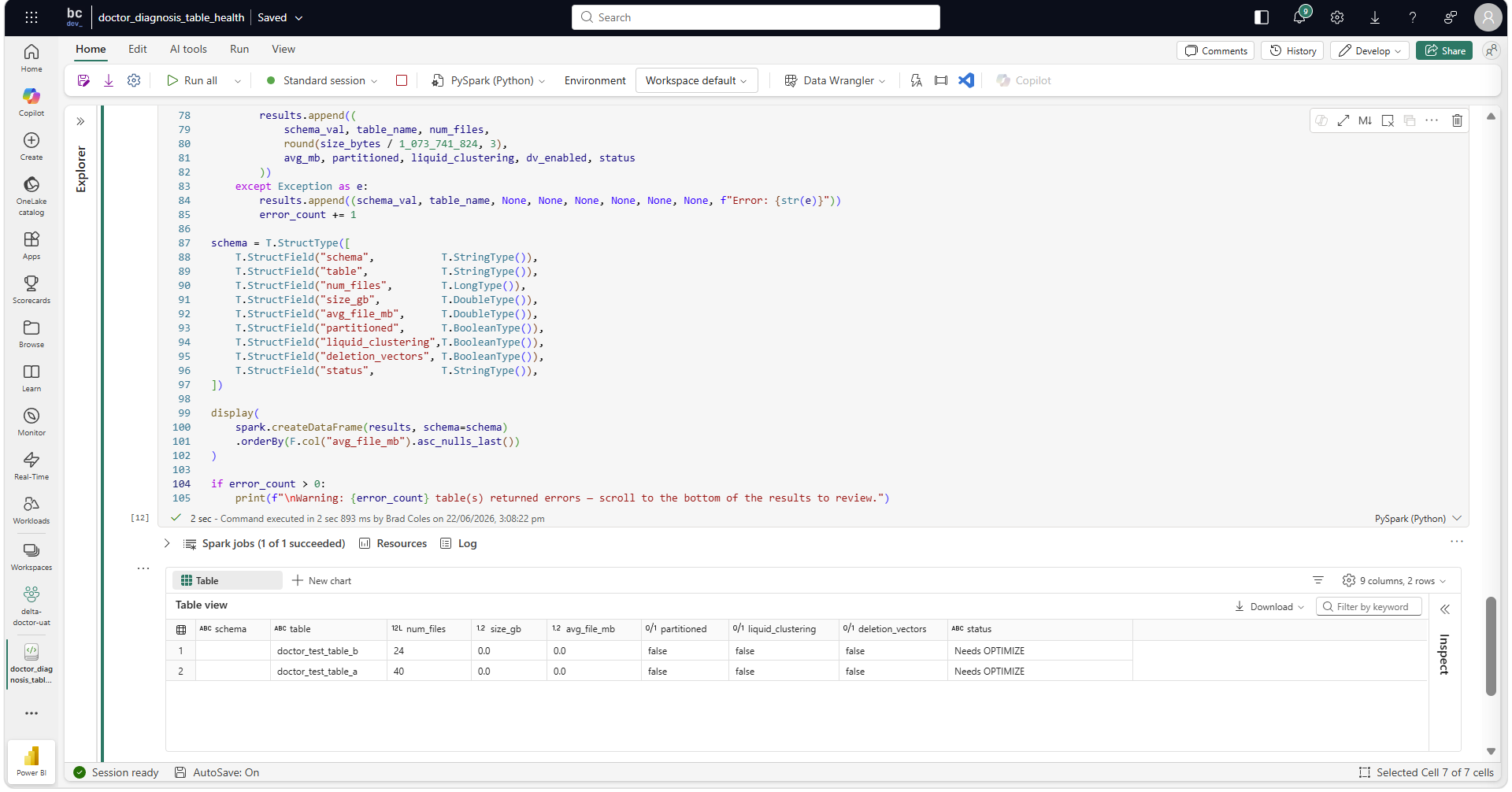
doctor_diagnosis_table_health: scans all tables in a Lakehouse and produces a health report: file counts, average file sizes, fragmentation status, deletion vector state, clustering state. Classifies each table as Healthy, Within tolerance, Review, Needs OPTIMIZE, Oversized, or a skip status. Runs in seconds; it's all metadata, no data scan.
Treatment
doctor_treatment_table_maintenance: OPTIMIZE + VACUUM on a single table, designed to be called as the final step of each pipeline load.
doctor_treatment_maintenance_orchestrator: OPTIMIZE + VACUUM across an entire Lakehouse. The starting point before per-table pipeline calls are in place, and the ongoing scheduled option for teams that prefer Lakehouse-wide maintenance over per-table wiring.
doctor_treatment_rebaseline_orchestrator: a one-off REORG TABLE APPLY (PURGE) + OPTIMIZE across every table in a Lakehouse. Purges accumulated deletion vectors and resets file sizes to the layer target. Run once on a neglected Lakehouse, then hand off to the maintenance orchestrator.
Preventative Care
doctor_prevention_session_config: Spark session baseline by medallion layer, called at the top of every pipeline notebook.
doctor_prevention_set_table_properties: Delta table properties per layer on a single table: deletion vectors, Auto-Compaction, Optimize Write, V-Order, target file size, and optionally liquid clustering.
doctor_prevention_set_properties_orchestrator: applies table properties across an entire Lakehouse in one run. The onboarding step for a new Lakehouse.
Design decisions worth knowing
OPTIMIZE is gated. Every OPTIMIZE call first reads table metadata via DESCRIBE DETAIL — no data scan, runs in milliseconds. If average file size is already within 80% of the layer target, the table is skipped. Microsoft's Fast Optimize handles bin-level evaluation within each run. On a well-maintained Lakehouse, most tables are skipped and the orchestrator run costs almost nothing. Oversized tables (average file size exceeding 2× the layer target) are also skipped; OPTIMIZE can't shrink files that are already too large, so doctor_treatment_rebaseline_orchestrator handles those via a full REORG + OPTIMIZE rewrite.
The VACUUM floor is enforced in code. VACUUM will never run with retention below 168 hours (7 days), regardless of what you pass as a parameter. This is not a documentation note: it is max(retain_hours, 168) on every path.
Layer targets are explicit. Bronze 128 MB, Silver 256 MB, Gold 400 MB. These ship as defaults but all notebooks support a custom mode for tables that do not follow medallion conventions.
Direct Lake is accounted for. Gold-layer VACUUM requires direct_lake_confirmed = True — the notebook raises a ValueError if it's not set. This is a manual flag, not an automated check. The expected sequence is: refresh your Direct Lake semantic model, confirm it has re-framed to the latest Delta commit, then run the notebook with direct_lake_confirmed = True. Worth noting: the flag asserts the refresh happened — it doesn't verify it. VACUUM removing files a Direct Lake model still references causes query errors until the next refresh; the gate forces that confirmation to be an explicit decision rather than a silent default.
Schema-enabled Lakehouses work automatically. Table enumeration uses mssparkutils.fs.ls() and _delta_log detection rather than SHOW TABLES, so both Tables/{table} and Tables/{schema}/{table} structures are handled transparently.
All of these behaviours (OPTIMIZE gating, the VACUUM retention floor, the Direct Lake gate) are covered by the 8-section deployment validation suite in the repo, with expected outputs, error cases, and a sign-off checklist for each notebook.
Getting started
Download the seven .ipynb files from the v0.1 release, import them into your Fabric workspace, and start with doctor_diagnosis_table_health. Pass your Lakehouse GUID as a parameter and run it — you'll have a full picture of your Lakehouse health before touching anything.
Your Lakehouse GUID is visible in the browser URL when the Lakehouse is open in Fabric: https://app.powerbi.com/groups/{workspace-guid}/lakehouses/{lakehouse-guid}.
Full documentation and a deployment walkthrough are at deltadoctor.dev. Before running the treatment or prevention notebooks against a production Lakehouse, work through the deployment validation guide in the repo — a structured acceptance test suite covering expected outputs, error cases, and a sign-off checklist for each notebook.
What's next
The plan for v0.2 is health history logging — doctor_diagnosis_table_health gains an optional parameter to append each run's snapshot to a Delta table. Over time that builds a per-table health trend, aimed at feeding a Power BI Direct Lake dashboard and a control table for per-table layer overrides in mixed-layer Lakehouses. These are directions, not commitments — the full roadmap is in the repo.
Beyond that, the aim is a pip-installable Python package (v1.0), and eventually a Fabric-native app built on Rayfin — Microsoft's open-source SDK for building code-first extensions that run natively inside a Fabric workspace, announced at Build 2026. A Rayfin app would deploy directly into your workspace with no external data transfer and governance inherited automatically — so you can run diagnosis and apply fixes through a proper UI without touching notebook code.
v0.1 is free and open-source (Apache 2.0). If it saves your team a SKU upgrade, a GitHub star helps others find it.
Brad Coles is a Senior Consultant and Data Engineering Capability Lead at Synechron Australia, specialising in Microsoft Fabric and modern data platform engineering. Connect on LinkedIn.
If this article helped you, click here to see some ways you can support me.